
FAQ
ZTACOM
VITAL RING (FAQ) - English 목록
-
Q
Introduction to VITAL RING
VITAL RING is a smart ring developed with Korean technology.
It continuously measures biometric signals every 10 minutes during rest, enabling precise analysis of stress level changes, sleep quality, activity patterns, and overall health management.
Even if you leave your phone at home while wearing VITAL RING and exercising outdoors, the collected biometric data will be transferred to the mobile app once the ring reconnects with the VITAL RING app.
Even when the app and ring are temporarily disconnected, the ring continues monitoring the wearer’s health 24 hours a day, 365 days a year.
Before Using VITAL RING
After opening the product for the first time, please fully charge the VITAL RING before use.
Battery life may vary depending on the sensor measurement cycle, but it can be used for approximately 4 days.
For stable operation, it is recommended to charge the ring every 2–3 days.
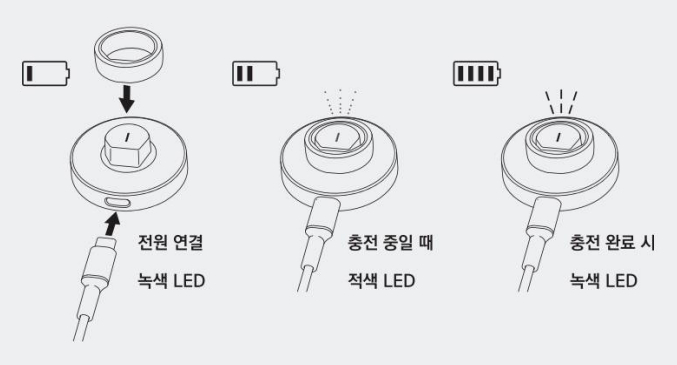
Connect the included wireless charging dock to a USB power source using the USB-C cable.
When the ring is placed on the charger, the LED indicator turns red during charging and green when charging is complete.
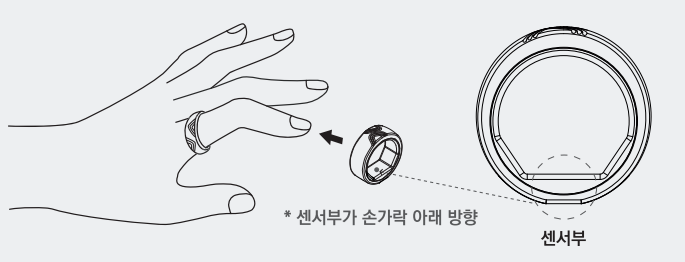
바이탈링 올바른 착용법 2) How to Wear VITAL RING Correctly
바이탈링을 충전한 상태에서 사용하세요.
1) 어느 손이나 착용할 순 있지만, 주 사용 손에 착용하면 걸음수 측정이 더 정확해집니다.
2) 바이탈링 안쪽의 맥파 센서가 손바닥 쪽에 오도록 (평평한 부분이 손바닥을 향하도록) 착용하세요. 아래 그림은 바이탈링을 착용하는 올바른 방법을 보여줍니다.
(* 정확한 측정을 위해 바이탈링을 착용한 손가락에 다른 반지를 착용하지 말아 주세요. )
3) 너무 느슨하거나 확 끼이지 않는 손가락에 착용하세요.
4) 바이탈링은 최대 100미터(328피트》까지 방수가 되므로 사워 또는 수영장 서 착용할 수 있습니다.
3) 모바일 앱 설치 (안드로이드 / iOS)
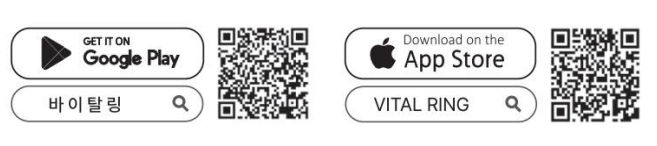 1) 바이탈링을 설정하고 사용하려면 최신 iOS 소프트웨어가 설치된 iPhone 또는 최신 Android OS가 설치된 Android 기기가 필요합니다.iOS 또는 Android 마켓(스토어)에서 “바이탈링” 또는 “VITAL RING” 을 검색하거나, 아래 QR 코드를 스캔하여 다운로드하고 설치해 주세요.2) 앱 실행전에 패키지 박스에서 바이탈링을 꺼내어, 먼저 충전기에 USB 전원을 연결하고 반지를 거치해 주세요. 출고 시 off된 반지의 전원을 켜는 과정입니다.3) 설치된 “바이탈링” 앱을 실행합니다.4) 앱 화면에 보이는 대로 로그인 회원 가입, 전화번호 입력, 정보 입력 및 앱 권한 허용을 순서대로 진행 해 주세요.5) “블루투스를 켜고 반지를 켜주세요” 화면을 클릭하여 반지를 검색합니다.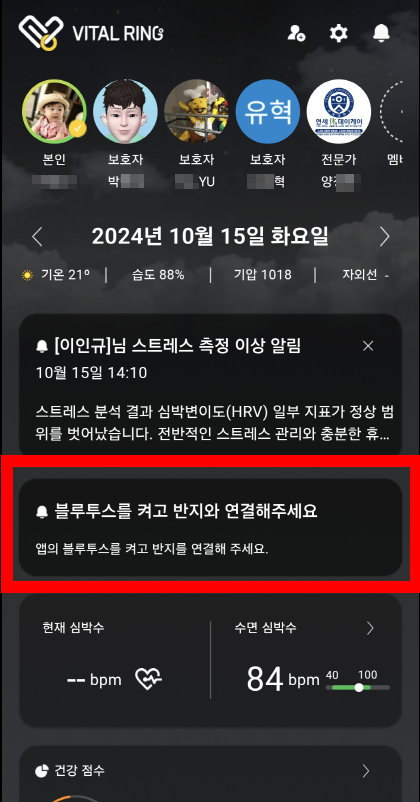
6. 바이탈링 고유번호 확인하기 – 기기연결 화면에서 가지고 계신 바이탈링의 고유번호와 일치하는 코드를 선택하세요. (* 고유번호는 패키지 박스 뒷면에 부착된 라벨에 있습니다.)
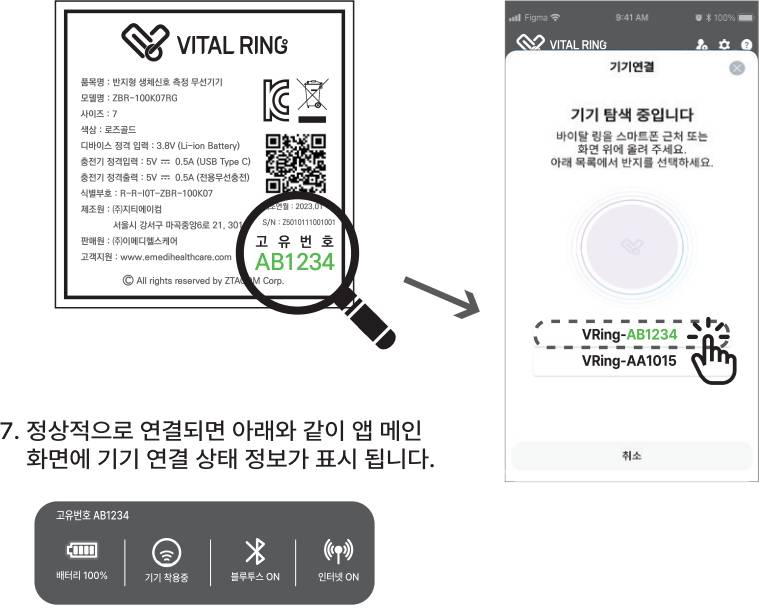
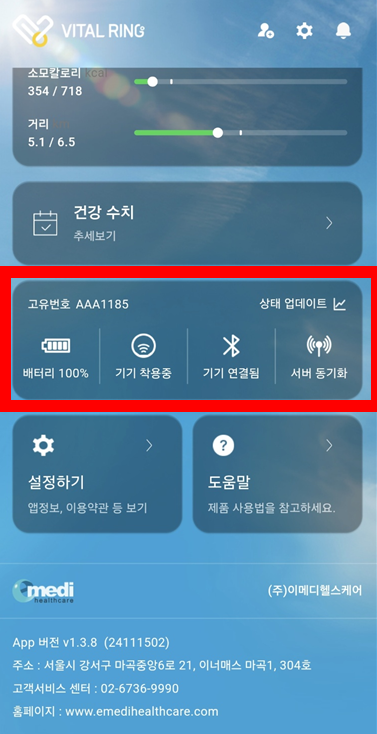
메인화면 하단에 정상 연결된 화면입니다.
ZTACOM
Main Office. 서울특별시 강서구 마곡중앙6로 21 이너매스 마곡1차 301호
R&D Office. 서울특별시 강서구 마곡중앙6로 21 이너매스 마곡1차 1016호
Tel. 02-6736-9990 E-mail. info@ztacom.com


